
Please Note: This article is written for users of the following Microsoft Excel versions: 2007, 2010, 2013, 2016, 2019, and 2021. If you are using an earlier version (Excel 2003 or earlier), this tip may not work for you. For a version of this tip written specifically for earlier versions of Excel, click here: Controlling the Plotting of Empty Cells.

Written by Allen Wyatt (last updated December 19, 2020)
This tip applies to Excel 2007, 2010, 2013, 2016, 2019, and 2021
When you create a chart from a data table, Excel does its best to translate the numeric values into data points on a chart, according to the specifications you provide. One area where Excel doesn't quite know what to do, however, is empty cells. If a cell is empty, it could be for any number of reasons—the value isn't available, the value isn't important, or the value is really zero.
You can instruct the program how you want it to treat empty cells by following these steps:
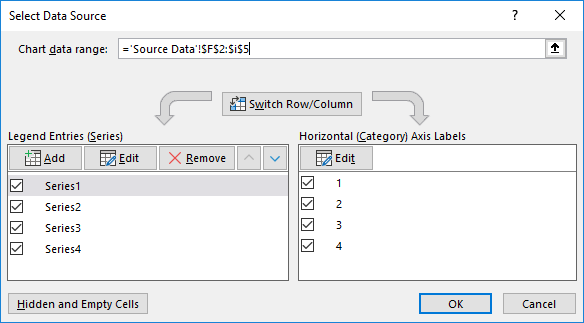
Figure 1. The Select Data Source dialog box.
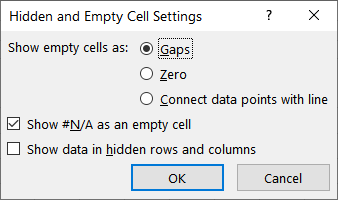
Figure 2. The Hidden and Empty Cell Settings dialog box.
The option buttons at the top of the Hidden and Empty Cell Settings dialog box (step 5) provide the following three settings:
ExcelTips is your source for cost-effective Microsoft Excel training. This tip (6289) applies to Microsoft Excel 2007, 2010, 2013, 2016, 2019, and 2021. You can find a version of this tip for the older menu interface of Excel here: Controlling the Plotting of Empty Cells.
Best-Selling VBA Tutorial for Beginners Take your Excel knowledge to the next level. With a little background in VBA programming, you can go well beyond basic spreadsheets and functions. Use macros to reduce errors, save time, and integrate with other Microsoft applications. Fully updated for the latest version of Office 365. Check out Microsoft 365 Excel VBA Programming For Dummies today!
Want the title of your chart to change based upon what is placed in a worksheet cell? It's easy; just add a formula to ...
Discover MoreFiguring out how to get the data points in an X-Y scatter plot labeled can be confusing; Excel certainly doesn't make it ...
Discover MorePie charts are a great way to graphically display some types of data. Displaying negative values is not so great in pie ...
Discover MoreFREE SERVICE: Get tips like this every week in ExcelTips, a free productivity newsletter. Enter your address and click "Subscribe."
There are currently no comments for this tip. (Be the first to leave your comment—just use the simple form above!)
Got a version of Excel that uses the ribbon interface (Excel 2007 or later)? This site is for you! If you use an earlier version of Excel, visit our ExcelTips site focusing on the menu interface.
FREE SERVICE: Get tips like this every week in ExcelTips, a free productivity newsletter. Enter your address and click "Subscribe."
Copyright © 2026 Sharon Parq Associates, Inc.
 Please Note:
This article is written for users of the following Microsoft Excel versions: 2007, 2010, 2013, 2016, 2019, and 2021. If you are using an earlier version (Excel 2003 or earlier), this tip may not work for you. For a version of this tip written specifically for earlier versions of Excel, click here:
Please Note:
This article is written for users of the following Microsoft Excel versions: 2007, 2010, 2013, 2016, 2019, and 2021. If you are using an earlier version (Excel 2003 or earlier), this tip may not work for you. For a version of this tip written specifically for earlier versions of Excel, click here:
Comments